Posts » A river of generators
User-created generators are showing up in a steady stream now, we're happy to report. Some of our favorites:
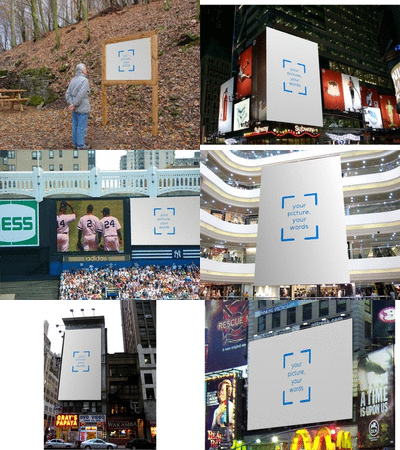
- A street sign by JaySticLe, made with the Billboard GOG.
- A spinning button by runningdog, made with the Blender Generator Wizard.
- An iPhone screen by an anonymous user, made with the Billboard GOG.
You can browse more on the complete generator list. So as not to be lazy and leave everything to users, I made a generator too - a green-dyed river as a practice run for St. Patrick's day. I would like to talk just a little bit about how I did it. The generator looks like this:
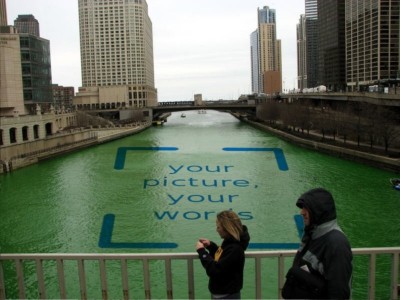
It is made exactly like a billboard with the Billboard GOG, with two important differences to the regular rectangular billboards most people are making:
- I wanted photos to be blended with the water, rather than on a blank background. So I unchecked the option for blanking the background. That part was easy.
- I wanted the photo to be behind the people on the bridge (and the bridge itself), and to lie within the borders of the river, which aren't really straight. So I uploaded a "mask" I prepared in a drawing program (I use GIMP, but you can use Photoshop or anything like that).
The mask I used looked like this:
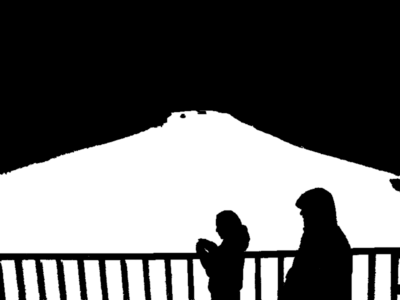
Preparing the mask took some time, but people who do photo editing regularly could probably do it much faster than I did. After the mask was uploaded, all I had to do was lay out a 3D rectangle that approximated the surface of the river. I did the geometrically correct thing, and it looked terrible. Photos of people would show with shrunken heads and vastly expanded necks, which is not very attractive. So I chose a more aesthetically pleasing (if less geometrically accurate) angle, and that worked out a lot better. It is funny how often taste and physics diverge in computer graphics...